> ## Documentation Index
> Fetch the complete documentation index at: https://hoopdev-docs-improve-idp-sso-pages.mintlify.site/llms.txt
> Use this file to discover all available pages before exploring further.
# Architecture
> Understand how Hoop's components fit together and how traffic flows through the system.
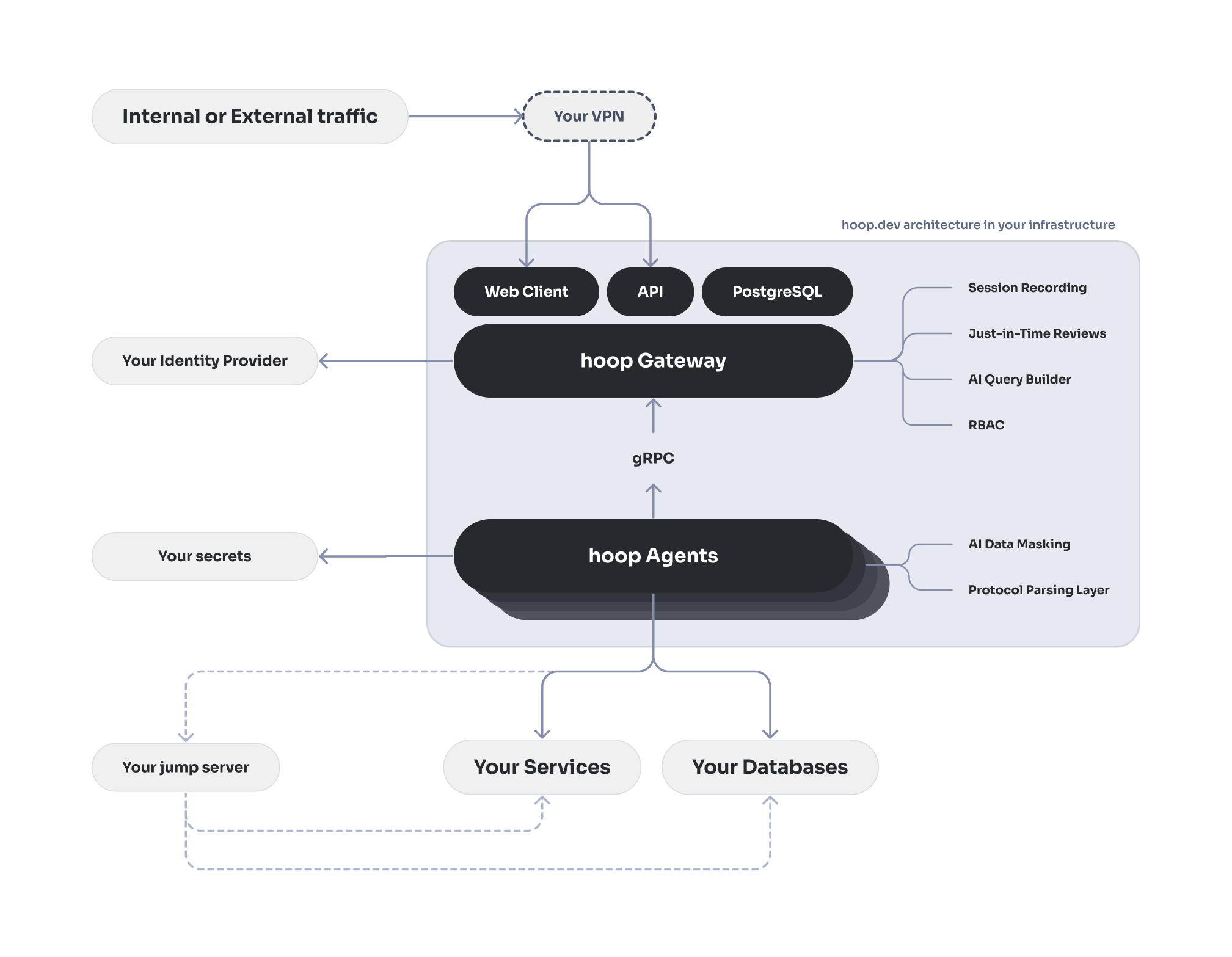
Hoop is a secure access gateway that sits between your users and your infrastructure. It proxies connections through a lightweight agent running inside your network — no inbound firewall rules required, no VPN needed, and nothing in your infrastructure exposed to the internet.
 ## Components
### Gateway
The gateway is the central hub of the system. It handles all user-facing traffic — authentication, authorization, session management, and policy enforcement — and coordinates with agents over a persistent gRPC connection.
The gateway runs as a single binary and exposes:
* **Web UI** — browser-based interface for managing connections, running queries, reviewing sessions, and approving access requests
* **REST API** — the same API the web UI uses; available for programmatic access and automation
* **gRPC server** — the internal transport layer used by agents and native clients to stream data
* **Protocol proxies** — native protocol listeners (PostgreSQL, SSH, RDP, HTTP) that allow standard tools to connect without any Hoop-specific client
The gateway requires a **PostgreSQL database** for storing connections, sessions, users, and audit data.
### Agent
The agent runs inside your network, close to the resources you want to expose. It establishes an outbound gRPC connection to the gateway — meaning your infrastructure never needs to accept inbound connections.
Agents run in two modes:
* **Standard mode** — a persistent long-lived process, managed as a system service. Best for databases, internal APIs, container platforms, and jump hosts.
* **Embedded mode** — runs alongside an application process, sharing its runtime context. Best for ad-hoc tasks, REPL consoles, and single-resource connections.
A single agent can serve multiple connections. See the [Agents](/concepts/agents) page for deployment details.
### Clients
Users connect to resources through:
* **Web UI** — browser-based access with a built-in code editor and terminal
* **Native clients** — standard tools like `psql`, `mysql`, `kubectl`, or `ssh` pointed at a local proxy port on the gateway
* **HTTP proxy** — browser or curl access to internal HTTP/HTTPS services via a time-limited session token
***
## Ports
| Port | Protocol | Purpose |
| ------- | ---------------- | -------------------------------------------- |
| `8009` | HTTP / WebSocket | REST API, Web UI, and browser-based sessions |
| `8010` | gRPC | Agent and native client communication |
| `15432` | PostgreSQL wire | Native `psql` / PostgreSQL client access |
| `12222` | SSH | Native SSH client access |
| `13389` | RDP | Remote desktop access |
| `18888` | HTTP / WebSocket | HTTP Proxy client access |
Agents only make **outbound** connections to port `8010`. No inbound ports need to be opened on the agent side.
***
## Session Flow
When a user connects to a resource, the following happens:
1. **Authentication** — the user authenticates via your identity provider (OIDC, SAML, or local auth). The gateway verifies the token and loads the user's identity and group membership.
2. **Authorization** — the gateway checks whether the user has access to the requested connection, based on access control rules and the connection's configured access mode
3. **Policy evaluation** — before the session begins, the gateway runs the request through an ordered plugin chain:
* **Reviews** — if JIT approval is required, the session is held until approved
* **Audit** — the request is logged
* **Data masking** — DLP rules are applied to inputs and outputs
* **RBAC** — role-based rules are enforced
* **Webhooks / Runbook hooks** — external systems are notified
4. **Agent dispatch** — the gateway forwards the session to the agent responsible for that connection. If the agent is offline, the connection fails.
5. **Execution** — the agent executes the operation against the target resource using native protocols (SQL, SSH, RDP, HTTP, etc.) and streams results back through the gateway.
6. **Response processing** — the gateway applies output-side plugins (data masking, audit logging) before returning data to the client.
***
## Network Architecture
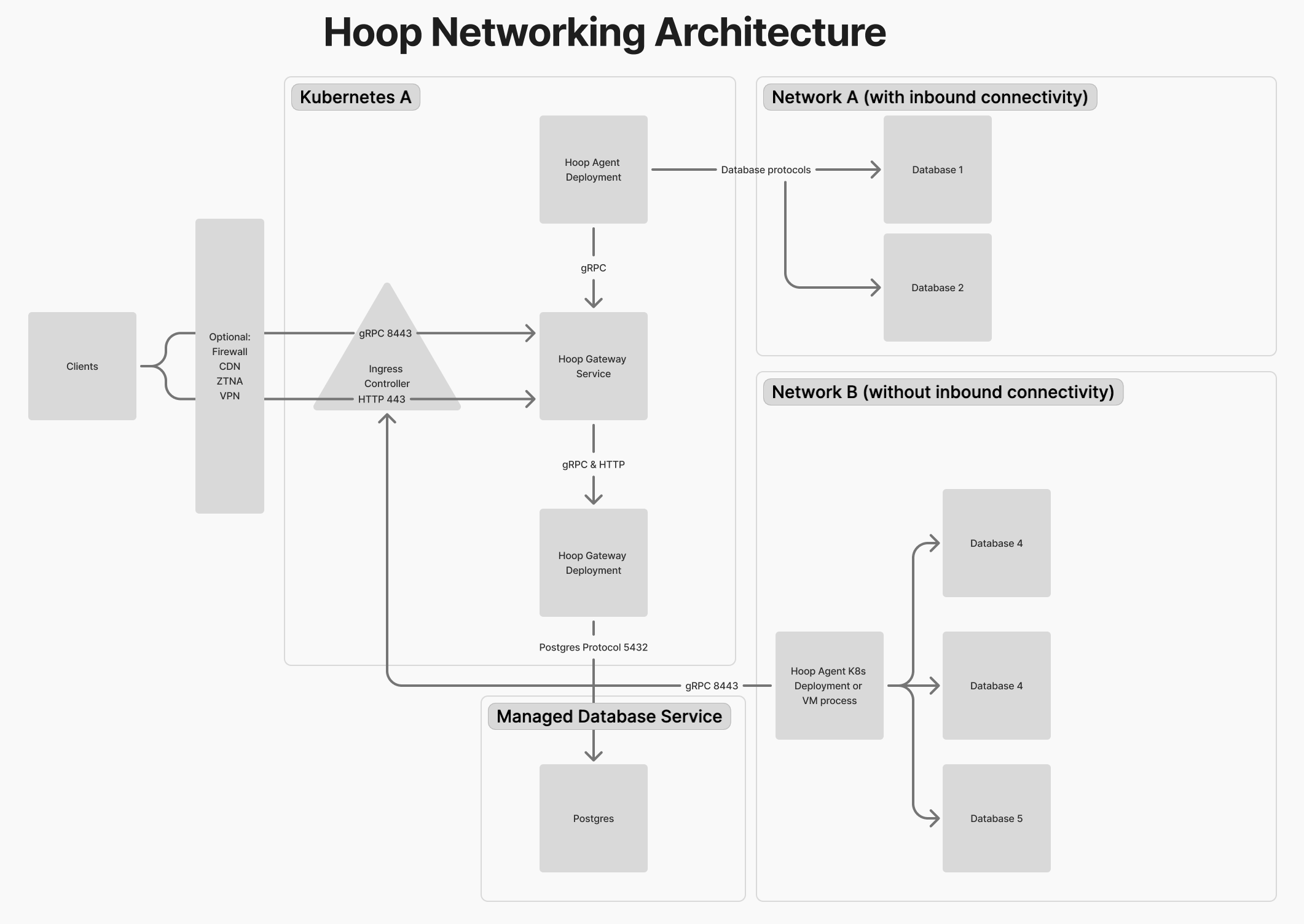
The diagram below illustrates deployment scenarios including Kubernetes and networks with or without inbound connectivity.
## Components
### Gateway
The gateway is the central hub of the system. It handles all user-facing traffic — authentication, authorization, session management, and policy enforcement — and coordinates with agents over a persistent gRPC connection.
The gateway runs as a single binary and exposes:
* **Web UI** — browser-based interface for managing connections, running queries, reviewing sessions, and approving access requests
* **REST API** — the same API the web UI uses; available for programmatic access and automation
* **gRPC server** — the internal transport layer used by agents and native clients to stream data
* **Protocol proxies** — native protocol listeners (PostgreSQL, SSH, RDP, HTTP) that allow standard tools to connect without any Hoop-specific client
The gateway requires a **PostgreSQL database** for storing connections, sessions, users, and audit data.
### Agent
The agent runs inside your network, close to the resources you want to expose. It establishes an outbound gRPC connection to the gateway — meaning your infrastructure never needs to accept inbound connections.
Agents run in two modes:
* **Standard mode** — a persistent long-lived process, managed as a system service. Best for databases, internal APIs, container platforms, and jump hosts.
* **Embedded mode** — runs alongside an application process, sharing its runtime context. Best for ad-hoc tasks, REPL consoles, and single-resource connections.
A single agent can serve multiple connections. See the [Agents](/concepts/agents) page for deployment details.
### Clients
Users connect to resources through:
* **Web UI** — browser-based access with a built-in code editor and terminal
* **Native clients** — standard tools like `psql`, `mysql`, `kubectl`, or `ssh` pointed at a local proxy port on the gateway
* **HTTP proxy** — browser or curl access to internal HTTP/HTTPS services via a time-limited session token
***
## Ports
| Port | Protocol | Purpose |
| ------- | ---------------- | -------------------------------------------- |
| `8009` | HTTP / WebSocket | REST API, Web UI, and browser-based sessions |
| `8010` | gRPC | Agent and native client communication |
| `15432` | PostgreSQL wire | Native `psql` / PostgreSQL client access |
| `12222` | SSH | Native SSH client access |
| `13389` | RDP | Remote desktop access |
| `18888` | HTTP / WebSocket | HTTP Proxy client access |
Agents only make **outbound** connections to port `8010`. No inbound ports need to be opened on the agent side.
***
## Session Flow
When a user connects to a resource, the following happens:
1. **Authentication** — the user authenticates via your identity provider (OIDC, SAML, or local auth). The gateway verifies the token and loads the user's identity and group membership.
2. **Authorization** — the gateway checks whether the user has access to the requested connection, based on access control rules and the connection's configured access mode
3. **Policy evaluation** — before the session begins, the gateway runs the request through an ordered plugin chain:
* **Reviews** — if JIT approval is required, the session is held until approved
* **Audit** — the request is logged
* **Data masking** — DLP rules are applied to inputs and outputs
* **RBAC** — role-based rules are enforced
* **Webhooks / Runbook hooks** — external systems are notified
4. **Agent dispatch** — the gateway forwards the session to the agent responsible for that connection. If the agent is offline, the connection fails.
5. **Execution** — the agent executes the operation against the target resource using native protocols (SQL, SSH, RDP, HTTP, etc.) and streams results back through the gateway.
6. **Response processing** — the gateway applies output-side plugins (data masking, audit logging) before returning data to the client.
***
## Network Architecture
The diagram below illustrates deployment scenarios including Kubernetes and networks with or without inbound connectivity.
 ***
## Deployment Topologies
### Single Node (Docker Compose)
Suitable for evaluation and smaller deployments. All components — gateway, default agent, PostgreSQL, and optional DLP services — run as containers on a single host.
See [Docker Compose deployment](/setup/deployment/docker-compose).
### Kubernetes
The recommended approach for production. The gateway runs as a pod (or multiple replicas), agents are deployed as separate pods close to your resources, and PostgreSQL is provided by an external managed service (e.g. RDS).
Optional components — data masking (Microsoft Presidio) and protocol proxies — can be enabled independently.
See [Kubernetes deployment](/setup/deployment/kubernetes).
***
## Authentication
The gateway integrates with your identity provider for user authentication. Supported methods:
* **OIDC / OAuth 2.0** — Okta, Azure AD, Google, Auth0, and any OIDC-compliant provider
* **SAML 2.0** — enterprise SSO
* **Local** — built-in username/password, suitable for self-hosted setups without an external IDP
Agents authenticate to the gateway using a signed token (`HOOP_KEY`) generated at registration time. Service accounts can be created for programmatic API access.
See [Identity Providers](/setup/configuration/idp/get-started) for configuration details.
***
## Deployment Topologies
### Single Node (Docker Compose)
Suitable for evaluation and smaller deployments. All components — gateway, default agent, PostgreSQL, and optional DLP services — run as containers on a single host.
See [Docker Compose deployment](/setup/deployment/docker-compose).
### Kubernetes
The recommended approach for production. The gateway runs as a pod (or multiple replicas), agents are deployed as separate pods close to your resources, and PostgreSQL is provided by an external managed service (e.g. RDS).
Optional components — data masking (Microsoft Presidio) and protocol proxies — can be enabled independently.
See [Kubernetes deployment](/setup/deployment/kubernetes).
***
## Authentication
The gateway integrates with your identity provider for user authentication. Supported methods:
* **OIDC / OAuth 2.0** — Okta, Azure AD, Google, Auth0, and any OIDC-compliant provider
* **SAML 2.0** — enterprise SSO
* **Local** — built-in username/password, suitable for self-hosted setups without an external IDP
Agents authenticate to the gateway using a signed token (`HOOP_KEY`) generated at registration time. Service accounts can be created for programmatic API access.
See [Identity Providers](/setup/configuration/idp/get-started) for configuration details.